


Intermittent turn signals 02 Explorer


Thread Starter
|
Junior Member
Joined: May 2012
Posts: 1
 Intermittent turn signals 02 Explorer
Sometimes the turn signals worked, other times not; sometimes one or two blinks, a series of quick clicks, then nothing. The problem was the flasher unit. The larger problem was replacing it. It is not easily accessible, sitting on top of the Passenger Compartment Fuse Panel, under the dash, left of the steering column, entirely out of reach.
Here's how I replaced it.
1. Disconnect the negative batter post
2. Remove the front lower dash panel. 2 hex head screws (7mm) at the bottom, the panel snaps off with a gentle forward pull.
3. Locate the Flasher Unit [number 1] (Google Image: Ford Passenger Compartment Fuse Panel . Mark one side with a Sharpie so you know the placement once it is out.
4. With a small screwdriver, pry out the old flasher unit. It will come out easily.
5. You will have to lower the fuse box to install the new unit. There are (2) 7mm hex head screws just above the LH kick panel on a black plastic bracket. The third you will have to search for with a flashlight, but its there between the fuse box and the steering column. The fuse box will only lower an inch, but that's all you'll need.
6. With a flexible mirror, take a look and see what you are dealing with before you put the new one in. Conveniently there are 4 posts to guide the new one in (Thank you, Ford!).
7. Mark the new flasher like the other so you'll know which direction it will have to be to fit. You'll thank me later.
8. Install the new unit, be patient and hope you don't have large hands - not much room to work.
There may be a better way, but I could not find it. I am a subscriber to All Data, which I highly recommend, but all it said was to remove the fusebox. Not much help. YouTube and Forums were no help, thus this post.
This YouTube video helped a little:
Hope it helps.
Here's how I replaced it.
1. Disconnect the negative batter post
2. Remove the front lower dash panel. 2 hex head screws (7mm) at the bottom, the panel snaps off with a gentle forward pull.
3. Locate the Flasher Unit [number 1] (Google Image: Ford Passenger Compartment Fuse Panel
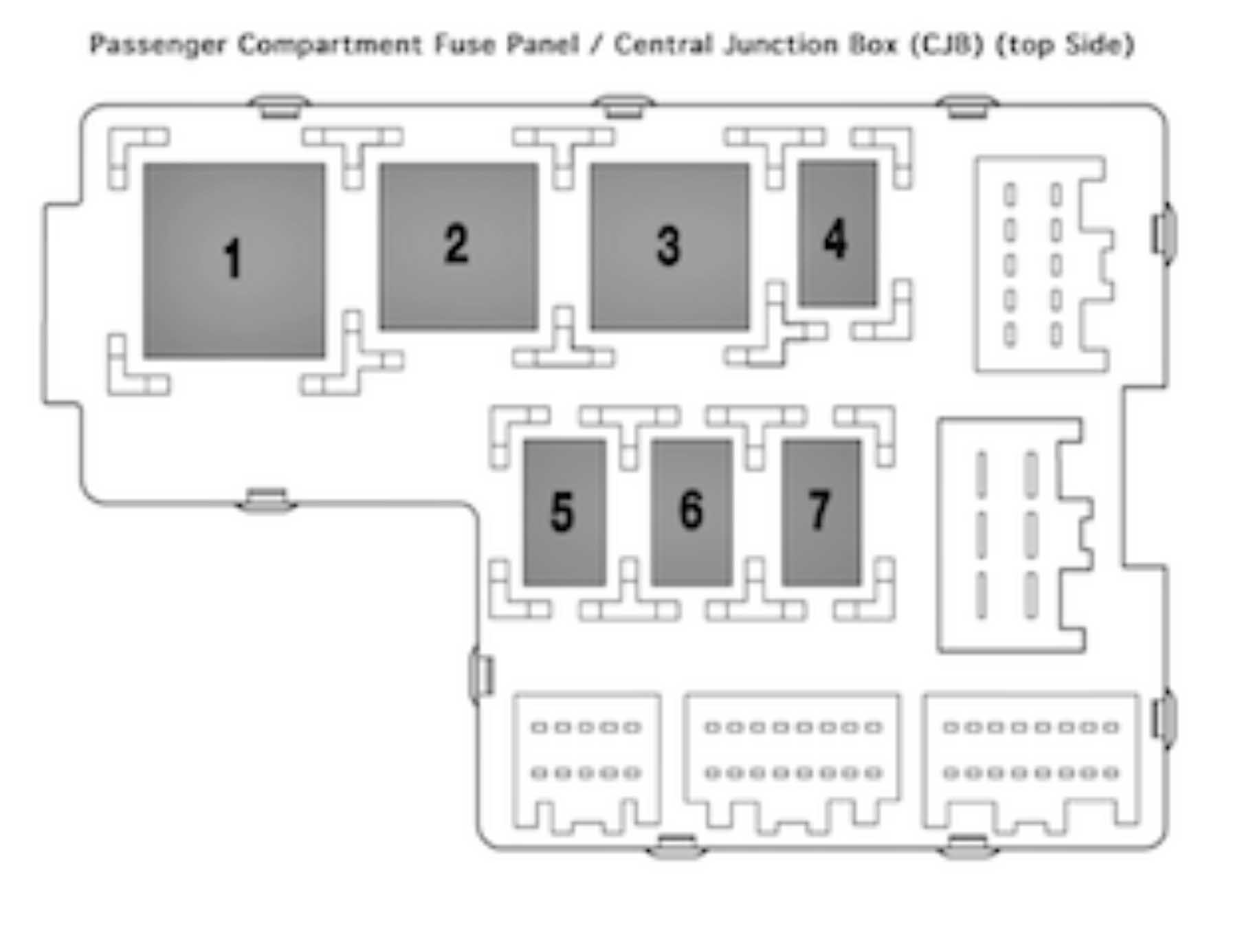 . Mark one side with a Sharpie so you know the placement once it is out.
4. With a small screwdriver, pry out the old flasher unit. It will come out easily.
5. You will have to lower the fuse box to install the new unit. There are (2) 7mm hex head screws just above the LH kick panel on a black plastic bracket. The third you will have to search for with a flashlight, but its there between the fuse box and the steering column. The fuse box will only lower an inch, but that's all you'll need.
6. With a flexible mirror, take a look and see what you are dealing with before you put the new one in. Conveniently there are 4 posts to guide the new one in (Thank you, Ford!).
7. Mark the new flasher like the other so you'll know which direction it will have to be to fit. You'll thank me later.
8. Install the new unit, be patient and hope you don't have large hands - not much room to work.
There may be a better way, but I could not find it. I am a subscriber to All Data, which I highly recommend, but all it said was to remove the fusebox. Not much help. YouTube and Forums were no help, thus this post.
This YouTube video helped a little:
Hope it helps.

Thread
Thread Starter
Forum
Replies
Last Post
